My homelab runs the services my household depends on1, and it’s where I learn infrastructure by breaking it. The rule I hold it to is cattle, not pets: every node is disposable, and the whole cluster is declarative enough to rebuild from Git.
It started as Proxmox VMs and Docker Compose stacks. It now runs as a bare-metal, three-node Kubernetes cluster on Talos Linux, with every piece of desired state living as text in Git.
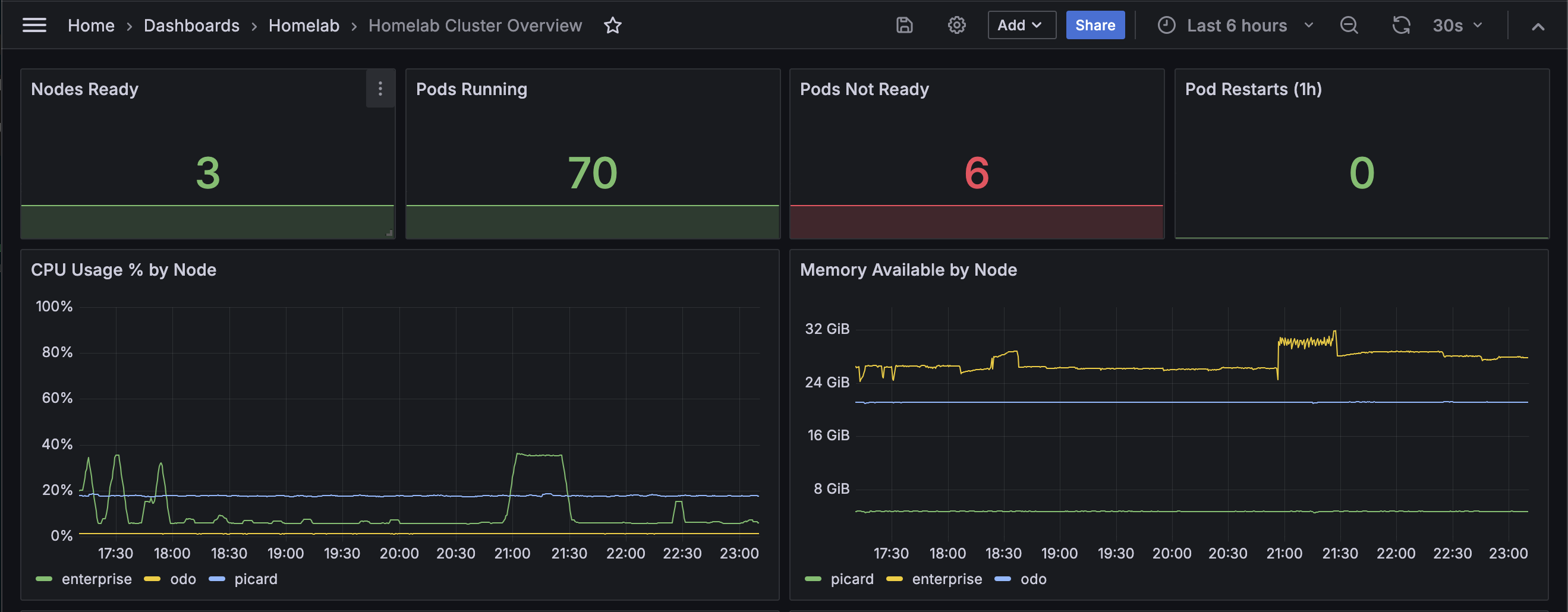
At a glance
Compute
Three physical nodes, all control-plane and worker:
| Node | Hardware | CPU | RAM | Role |
|---|---|---|---|---|
| Enterprise | Custom ITX | Intel i5-10400 (6c/12t) | 64 GB DDR4 | Media and QuickSync transcoding, RAM-heavy stateful services |
| Odo | Minisforum BD795i SE | AMD Ryzen 9 7945HX (16c/32t) | 32 GB DDR5 | High-thread compute, isolated game servers |
| Picard | Intel N100-class mini PC | Intel N100 | 8 GB DDR4 | Third control-plane node for etcd quorum, light services |
Storage
- Enterprise: dual 2 TB NVMe in a ZFS mirror, a 4 TB SSD for media, a 240 GB boot drive.
- Odo: 2× 4 TB NVMe, one for Talos and one for a single-disk ZFS pool. (Need to get a boot drive)
- Picard: a single 500 GB SSD.
- Persistent volumes are provisioned dynamically against node-local ZFS pools (OpenEBS ZFS-LocalPV).
Stack
| Layer | Choice |
|---|---|
| OS | Talos Linux: immutable, API-managed, no shell |
| CNI | Cilium: eBPF, kube-proxy replacement, L2 LoadBalancer IPs, NetworkPolicy |
| Gateway | UniFi Cloud Gateway: zone-based firewall, default-deny between LAN / Server / IoT / Guest VLANs |
| Internal DNS | Blocky: 3 replicas behind one VIP, split-horizon, network-wide ad blocking, DoT/DoH upstream |
| Remote access | Tailscale Kubernetes operator: per-service tailnet names, managed HTTPS, no inbound ports |
| TLS | Per-service Caddy sidecars: Let’s Encrypt via DNS-01 |
| Runtime security | Tetragon: eBPF process / socket / file visibility, observe-only for now |
| Observability | Vector → ClickHouse → Grafana for logs and detections; VictoriaMetrics for metrics |
| Secrets | SOPS + age, decrypted only at apply time |
Workloads
- Jellyfin
- A Linux ISO distribution and archival pipeline 😄
- Containerized game servers
- A homelab status dashboard
- Just gives me links to my internal sites
- An observability and detection pipeline
Each runs in its own namespace with resource limits and a default-deny NetworkPolicy.
Why Talos
Most distributions hand you a shell and trust you not to break things. On Proxmox I leaned on Ansible to keep that in check, but the playbooks kept growing, and they only ever described part of each VM. Anything a playbook didn’t mention was free to drift.
Talos takes away every way to log into a box and change it by hand:
- no shell
- no SSH
- no package manager
- a read-only root filesystem
The only way to change a node is to send it a new machine config over its API.
That sounds restrictive, and it is. It’s cattle, not pets, enforced at the OS layer. I can’t hand-tweak a node into a snowflake because there’s nowhere to type the tweak. Everything goes through config:
- Each node’s config is generated from the repo by
talhelper. - Loading the
zfskernel module is a config patch. - Kernel logs come from
talosctl dmesg.
When a node misbehaves, I don’t log in and fix it. I re-apply its config.
Talos doesn’t keep Git and the nodes in sync for me (that’s what Flux is for). If I commit a change and never apply it, the node keeps running the old config. What it does guarantee is that a node’s OS is exactly the last config I applied, with nothing layered on top.
Immutability helps security, up to a point. Someone who gets root on a node has a much harder time making it stick. It doesn’t stop them getting root in the first place, which is part of why I run Tetragon.
Why Cilium
Cilium is the cluster CNI, running as a full eBPF kube-proxy replacement. It’s more to learn than the Flannel and kube-proxy that Talos ships with, but it turns a pile of parts into one. I have one data plane that:
- moves pod traffic
- encrypts traffic between nodes with WireGuard
- hands out LAN LoadBalancer IPs via L2 announcements
- enforces NetworkPolicy
- surfaces every network flow through Hubble
The alternative was kube-proxy plus MetalLB plus a separate policy engine, since Flannel doesn’t enforce NetworkPolicy on its own. Cilium does all of that in the agent already running on every node for pod networking. Adding LoadBalancer IPs was just a config change.
Every namespace gets a default-deny NetworkPolicy and a narrow allowlist. Hubble is what makes that maintainable. When a flow is denied, I can find the drop instead of guessing what’s actually talking to what.
One “issue” I came across is that default-deny fails quietly. A missing rule doesn’t throw an error, the packet just disappears. One time I created a policy that dropped every DNS query from the nodes, and caches hid it for ten days. Port-53 drops have their own alert now.
Why Tetragon
Talos forwards kernel audit logs, so I already had process-execution telemetry. What it lacked was Kubernetes identity. An audit record tells me /bin/sh ran as uid 0, but not which pod it ran in, and on a cluster that’s the part I actually need.
Tetragon is Cilium’s eBPF runtime security agent. Every event carries the pod, container, and namespace, plus the chain of parent processes that led to it. It also needed no new plumbing since events go to stdout, and Vector already ships stdout into ClickHouse.
Enforcement is the risky part. Tetragon can kill a process or block a syscall, and it does it in the kernel the moment a policy matches. Nothing reviews it first, and nothing rolls it back. A bad Deployment just fails to start and a bad enforcement policy acts on every node.
My first enforcement policy silently failed to match the pod it was scoped to. I caught it in observe mode, which is the whole argument for observe mode. Everything still runs observe-only, and no TracingPolicy ships without a lot of review. 😅
Networking and edge
Segmentation happens in two places: at the gateway, and again inside the cluster. Default-deny is the baseline in both.
- Gateway (UniFi):
- routes between the LAN, Server, IoT, and Guest VLANs through a zone-based firewall
- default-deny between VLANs, only required flows allowlisted
- UniFi switches and APs carry the tagged networks
- DNS (Blocky):
- three replicas, one per node, behind one LoadBalancer IP
- split-horizon answers for local names
- network-wide ad blocking
- DoT / DoH upstream
- Remote access (Tailscale):
- the Tailscale operator puts selected services on the tailnet by name, with managed HTTPS
- no open inbound ports at home 2
- Public edge (Pangolin):
- game servers are public through a small VPS running Pangolin
- a tunnel client in the cluster dials out to the VPS, so player traffic arrives without a port-forward
- Cilium policy limits that tunnel to the game servers
- TLS (Caddy):
- each service runs its own Caddy sidecar terminating HTTPS with Let’s Encrypt certs
- LAN services live under
mattsepe.la - anything meant to be public lives on a separate domain, with one shared wildcard cert for HTTPS
Observability
Everything logs somewhere I can query. The pipeline is self-hosted end to end, partly because I want the data and partly because building the detection side is the security work I actually enjoy:
- Vector collects Talos host logs, container output, Kubernetes audit events, Cilium’s dropped flows, and the UniFi gateway’s firewall logs.
- ClickHouse stores all of it, with 30 days of retention.
- Detections are SQL queries that run every five minutes against ClickHouse and post matches to Discord. The detection pipeline post covers how.
- VictoriaMetrics keeps 30 days of metrics, enough to know what normal looks like for each workload.
- Grafana sits on top for dashboards and health alerts.
Storage and backups
Volumes come from ZFS pools on Enterprise and Odo through OpenEBS ZFS-LocalPV. Each storage class lives on one node, so an app always runs where its disk is, and can’t fail over to another node. The one exception is the shared media library where there is one ZFS dataset that the media apps mount directly.
The media pool’s SSD is dying, and I’m letting it. Everything on it is Linux ISOs I can download again. 😄 (I wish SSDs were cheaper )
Every night, a backup job snapshots whatever’s due, compresses and encrypts it, and copies it offsite.
That’s the short version. Backup and recovery is the part I’ve thought about most, so it gets its own note later.